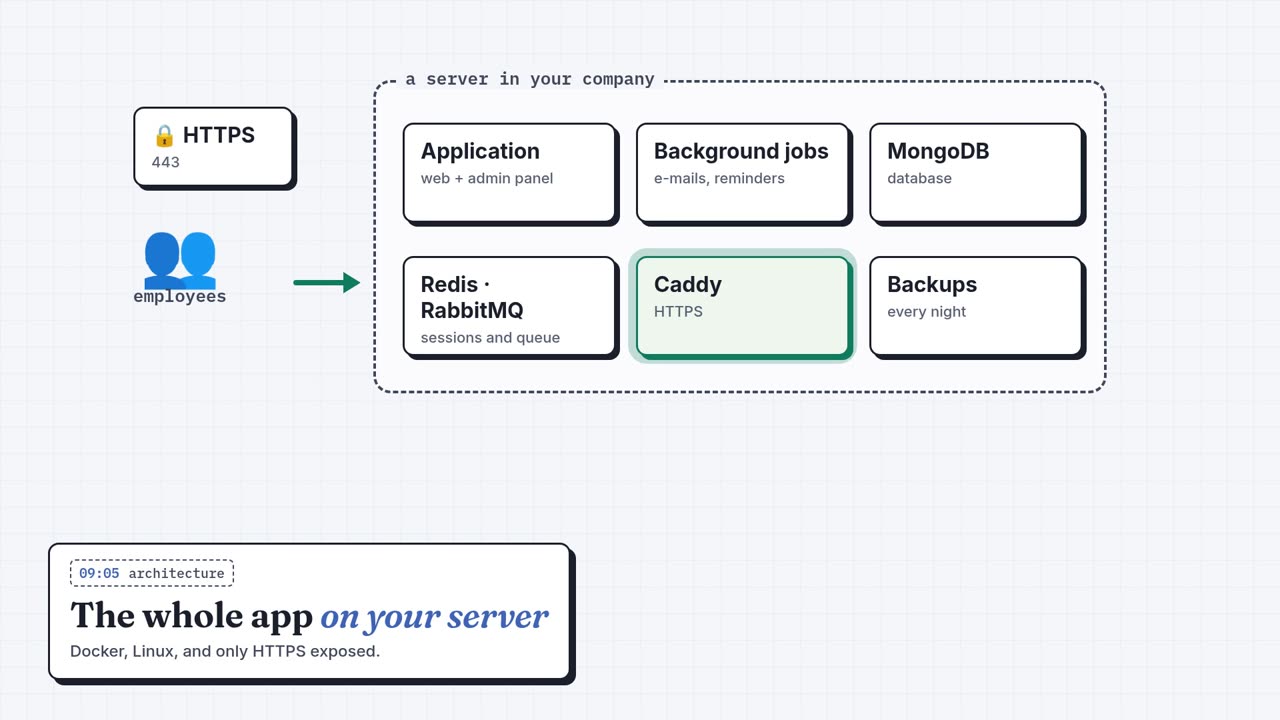
Your data stays in your network.
The database runs on your server. We have no access to it, so in normal operation we never process your data.
On-premise edition available from November 2026
HourPow delivers mojegodzinki.pl, a time tracking and project cost platform built in Poland, as an installation in your own infrastructure. Web, mobile, QR and NFC attendance, deployed with Docker Compose, even without internet access. One subscription per active user, updates included.
Technical calls are open now. Same application as the cloud edition. Your team sees your company name and logo.
The same application as the cloud edition at mojegodzinki.pl, just running at your address.
Recorded in the cloud edition. On your server it looks the same, with your company name and logo.
How the on-premise edition works, in 42 seconds:
For companies where client NDAs, security policies or an isolated factory network rule out a public cloud time tracker.
Your NDA lawyer can finally sleep at night.
The database runs on your server. We have no access to it, so in normal operation we never process your data.
A nightly database backup with rotation is built in. You decide where copies go and how long you keep them.
The licence is checked offline, every update arrives as one bundle you can carry in on a USB stick, and phones and NFC kiosks talk to your server over the local network.
If a subscription ends, nothing is deleted. The application becomes read-only, and your administrator can always export everything to Excel.
Not a reduced fork: the on-premise edition runs the same code as the cloud edition, so every improvement reaches your installation too.
Same app, different address.
Hourly rates per person and per project, billable project rates, and cost, revenue and profit in every summary and Excel export.
Ready roles (Reporter, Viewer, Admin) or your own roles built from more than 35 permissions, set per group. Financial data is filtered on the server, never just hidden in the browser.
Employees mark reports ready. Managers approve or reject with a comment, approved entries are locked against edits, and the approval history is kept.
Your own columns: dictionary picklists, time ranges, numbers, dates, yes/no and links, with required fields. Import projects and clients from Excel.
Clock in by scanning the group QR code, or tap an NFC card at an Android tablet kiosk. Geofencing is checked by your server. Five levels of edit restriction.
Developers add their GitHub.com or GitLab.com commits to daily reports, with links. On-premise it is switched on at your request and needs your own OAuth app and internet access.
All features and the user guide at mojegodzinki.pl →
These screens exist only in your installation, so you won't see them in the cloud edition. We show them live on the technical call.
Accounts and users, an activity log, error and mail queue views, an IP block list, a read-only data browser and the registration mode.
Company name, logo, favicon, e-mail sender and footer, plus links to your own terms and privacy notice. Changes apply without a restart.
See users in use against your tier, upload a renewed licence file without downtime, and switch the whole instance to read-only for an audit or year-end close.
One compose file, one settings file, one licence file. No Kubernetes needed.
Your Kubernetes cluster can take the day off.
We go through your network, SMTP, user count and security questions.
You get a private, expiring download link to the release bundle with its checksum, or the bundle on a USB stick, plus a licence file bound to your domain.
The installer asks for your domain, admin e-mail, SMTP server and time zone, and generates all passwords itself. We can assist.
Renew or add users by uploading a new licence file in the admin console. No restart, no internet connection.
One HTTPS entry point, data services on an internal network, and no vendor credentials in the images.
Ideally before you get to question 147.
Only the proxy is exposed: port 443, plus port 80 if you use automatic certificates. Everything behind it runs on an internal Docker network.
Anyone whose client contract says “no third-party cloud” in bold.
Keep client names, project code names and hourly rates under your NDAs while tracking profitability of fixed-price and time-and-material work.
Keep timesheets ready for R&D tax credit and grant reporting without sending research project data to a third-party cloud.
Record shift attendance with NFC cards at Android tablet kiosks that work entirely inside your local network.
Need network isolation, single sign-on or LDAP, or leaving Atlassian Data Center? Tell us your requirements →
Same application. The differences are in who runs it and what connects to what.
Spot the difference: it's mostly the address.
| Area | Cloud: mojegodzinki.pl | On-premise via HourPow |
|---|---|---|
| Where data lives | Our servers | Your server |
| Who runs it | We do | You run the server, network and backup copies. We provide the application, updates and licence. |
| Internet access | Required | Not required. Used only by optional features: automatic certificates, map tiles, and on request Google sign-in and GitHub/GitLab.com. |
| Registration | Open sign-up | Invitation or allowed e-mail domains; open sign-up only if you enable it |
| Sign-in | E-mail with two-factor code, Google, Apple | E-mail with two-factor code; Google on request; single sign-on on the roadmap |
| GitHub and GitLab | Built in | On request, with your own OAuth apps; github.com and gitlab.com only |
| Mobile app | iOS and Android | The same app, connected to your server with a QR code |
| Admin console, branding, activity log | Not available to customers | Included |
| Updates | Automatic | A release bundle you install with one script, when it suits you |
| Pricing | Plans and add-ons, in PLN | Subscription per active user, in EUR, billed yearly or quarterly |
Every feature included. No fees per group, project or role.
No surcharge per meeting that could have been an email, either.
From €5 per active user per month
€1,500 per year for up to 25 active users, billed yearly in advance. Quarterly billing on request. Prices exclude VAT. Administrators count as users.
| Active users | Per year | Per user per month |
|---|---|---|
| Up to 25 | €1,500 | €5.00 |
| Up to 50 | €2,700 | €4.50 |
| Up to 100 | €4,800 | €4.00 |
| Up to 150 | €6,300 | €3.50 |
| More than 150 | Ask for a quote → | |
Nothing is deleted. Not even that project nobody talks about any more.
Read the licence terms summary →
The cloud edition at mojegodzinki.pl runs the same application. Create a free workspace to try timesheet columns, project rates, approvals and QR attendance.
For security teams: please test with sample data, not client data. To see the on-premise admin screens, book a technical call.
And from the one person who reads the licence terms to the end. Hi.
A Linux x86_64 server, for example Ubuntu 22.04 or 24.04 LTS or Debian 12, with Docker Engine and Docker Compose 2.23 or newer. Up to about 50 users: 2 vCPU, 4 GB RAM and 40 GB disk. For 100 to 150 users: 4 vCPU, 8 GB RAM and 40 GB disk. You also need a domain name and an SMTP server; e-mail carries sign-in codes, invitations and reminders, and works with or without SMTP login and TLS.
Docker Compose: one compose file, one settings file and one licence file. Kubernetes charts and VM images are not provided.
MongoDB with authentication enabled, shipped in the package together with Redis and RabbitMQ. Everything runs on your server. A nightly backup of the database and uploaded files, with rotation, writes to a folder you choose, which can be on a NAS. Copying backups off the server is up to you, and restore is documented. Keep a copy of your settings file and licence too, because they hold your passwords.
Every release is one bundle with all container images and a checksum. You download it from a private link we send you, or get it on a USB stick, so the server itself never needs internet access. The upgrade script backs up the database first, and database migrations run automatically, even when you skip versions.
Yes. The licence is bound to your domain name, not to hardware. The built-in proxy gets a certificate automatically when the server is online, or you use your own. Phones must trust it, so use a public certificate or your internal CA distributed by MDM; self-signed certificates are not supported. If your own proxy or load balancer sits in front, it must forward the client IP address.
Employees install the mojegodzinki.pl app from the App Store or Google Play, choose "Company server" and scan a QR code from your admin console. The phone talks directly to your server, and the address is stored only on the phone. The app uses no push notification service.
Yes. QR and NFC scans work on your local network, and your server checks the location against the geofence. Only the map background on the geofence setup screen loads tiles from OpenStreetMap, so without internet that map stays blank.
Not yet. Users sign in with e-mail and password plus a one-time code sent by e-mail. On request, we enable Google sign-in with your own Google Cloud client, which Google Workspace can restrict to your domain. Single sign-on (Microsoft Entra ID, Google Workspace) and LDAP are on our roadmap. Tell us in the form if you need them.
No. The licence is checked offline, and there is no telemetry, no update check and no remote access. Outbound connections happen only for optional features: automatic certificates, map tiles on the geofence setup screen, and, if you ask us to enable them, Google sign-in and GitHub.com and GitLab.com.
Your administrator runs one script on the server and sends us the package it makes. It works even when the application is down. It holds versions, container health, licence state, record counts and recent logs. Passwords are removed, and e-mail addresses and IP addresses are masked.
You are. We have no access to your server, so we are not a processor. If you send us personal data in a support case, for example in log lines, a data processing agreement covers it. The app shows links to your own terms and privacy notice, never ours.
The interface and e-mails are in English and Polish. You set the time zone at installation. Public holidays currently follow the Polish calendar.
HourPow delivers mojegodzinki.pl as an on-premise installation. Both are run by ISNAJS Sp. z o.o. in Warsaw. mojegodzinki.pl is where you can see how the application works and try it in the cloud.
You talk to the team that builds mojegodzinki.pl. We go through the architecture, show the admin console and answer your security questionnaire.
Customers deploying in November or December 2026 get assisted installation at no cost and a direct say in what we build next, such as single sign-on.
We reply within one business day (CET).
One e-mail is enough. The button opens your e-mail app with these questions already in the message. Answer what you can.
Company:
Active users (about):
Linux server with Docker? (yes / no / not sure):
Must it run without internet access? (yes / no):
How should people sign in? (e-mail and 2FA / Google Workspace / SSO or LDAP):
Billing (yearly / quarterly / monthly, not offered yet):
Would a private instance hosted by us suit you better? (not offered yet):
Good times for a 30-minute call (CET):

Questions:
Write to kontakt@mojegodzinki.pl
No form, no captcha, no tracking: your message goes straight to our inbox. Privacy policy